

Background
AWS DMS is a great service. It helps you connect to your source database and migrate it to your target AWS-hosted database. Almost all known commercial engines are supported as source databases. This includes Postgres, MySQL, Oracle, Microsoft SQL Server, Sybase ASA, and others. The data from your source database ends up in a target database hosted on AWS. Among others, AWS DMS supports S3, Kinesis, and Redshift as target databases.
Here at Cloudwalker, we use DMS quite extensively. In fact, for our various clients, we manage database migration for nearly 200 databases hosted on-premises. Most often, we use S3 as the service where the data from our AWS DMS tasks ends up. This is ideal for data analytics workloads since you are syncing your production database directly to a data lake via a managed DMS task. You can choose CSV and Parquet as file formats. You can also add transaction timestamps from the source database, which will help you with your data transformations later. We also use the so-called CDC migration method. During CDC-based migration, the S3 destination layer also contains all the changes that occurred on the table rows within the source database.
The problem: LOB fields
The most common problems we encounter are LOB (Large Object) fields. What most engineers today forget is that databases view LOB columns differently than columns with other types. For example, in Microsoft SQL Server, columns with type NVARCHAR(max) are considered LOB fields. In this case, it is easier for the developer not to limit the size of the string field, so they create a problem, mostly for themselves. Microsoft SQL Server allows the size of a LOB field to be 2 terabytes.
"Read this again: 2 terabytes!"
This means that in the database page file, SQL Server will store a pointer to a disk location for a LOB field. Therefore, each access to a column with LOB fields will have overhead in the number of operations related to accessing and reading the LOB field.
Diagnosing the issue
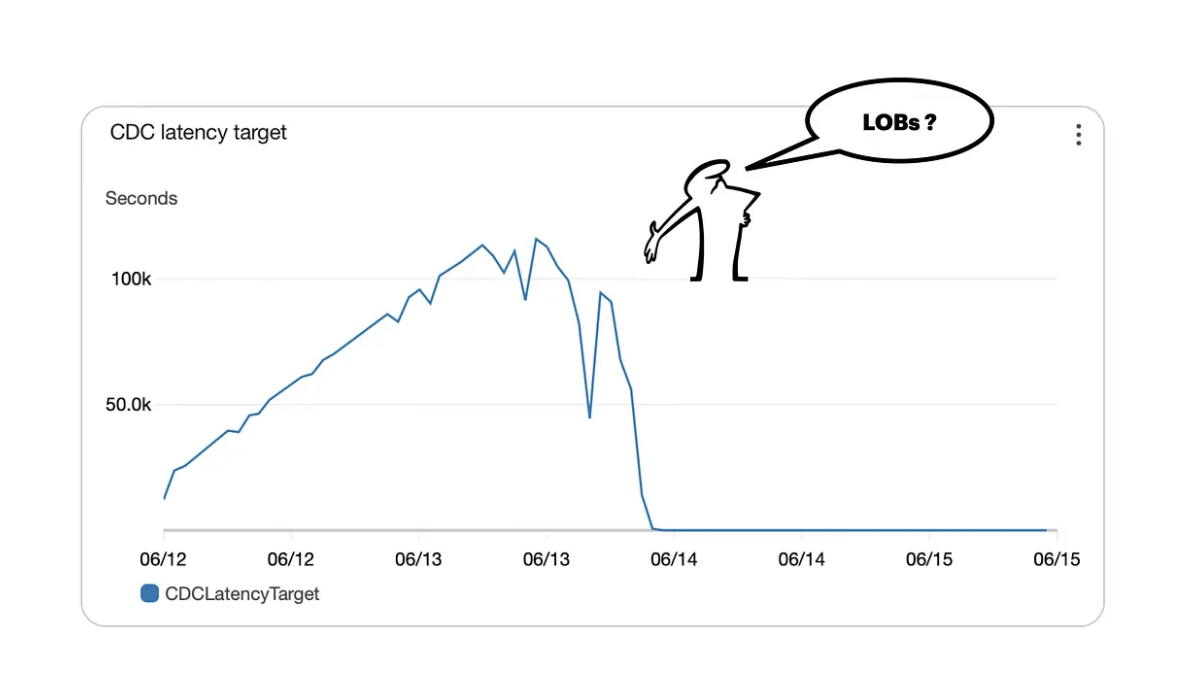
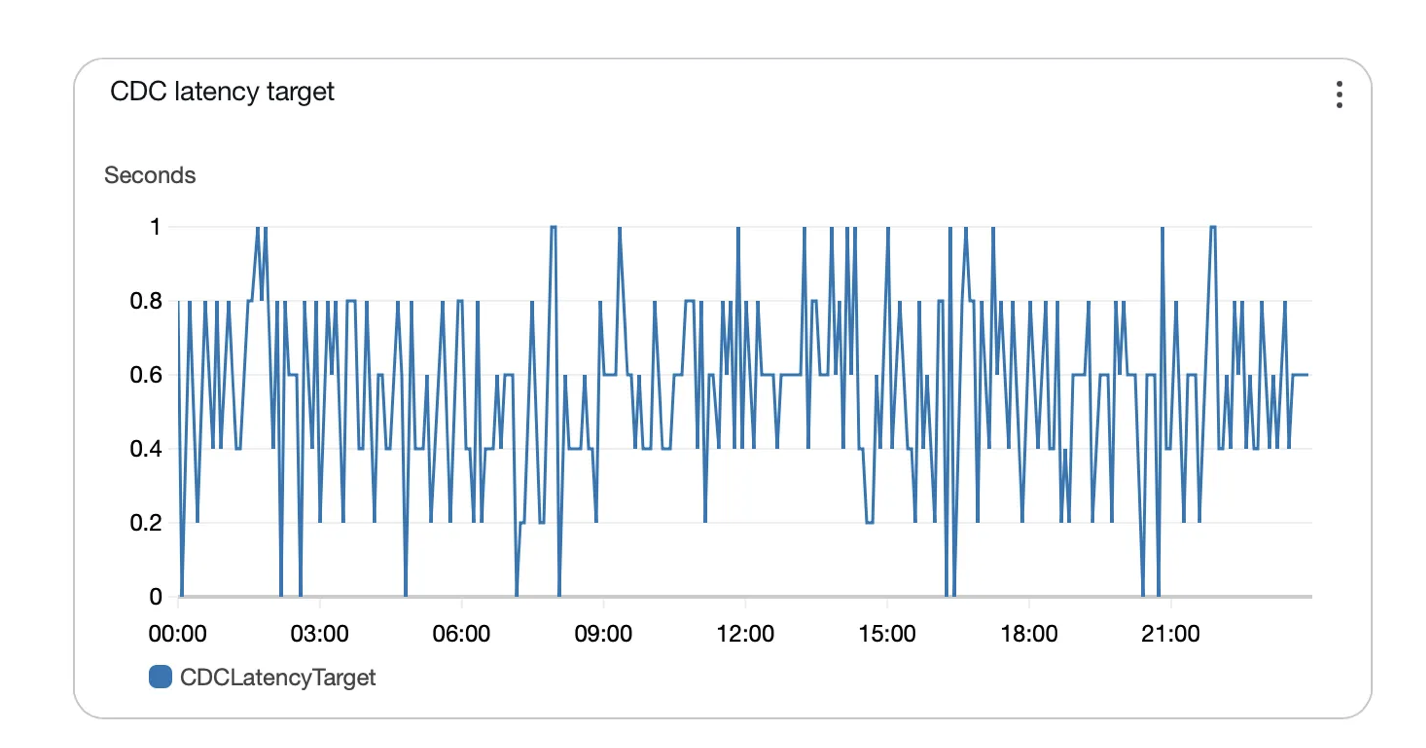
If you start a DMS task with Microsoft SQL Server as a source and S3 as a target, go to the monitoring tab and check the metrics. Specifically, you are interested in the CDC latency target metric. Latency target actually measures the number of seconds your S3 records are behind your source database. In our case, we had close to 120,000 seconds of target latency. That is ultra slow!
So we checked CloudWatch logs. We noticed this log message: "Going to fill lob data for columns in table schema_name.table_name"
We wanted to check how many log messages like the one above we had per source SQL Server table. For that, we ran the following CloudWatch Logs Insights query:
filter @message like /Going to fill lob data for columns in table/
| parse @message "* Going to fill lob data for columns in table *.*"
  as prefix, schema, table
| stats count(*) as count by schema, table
| sort count desc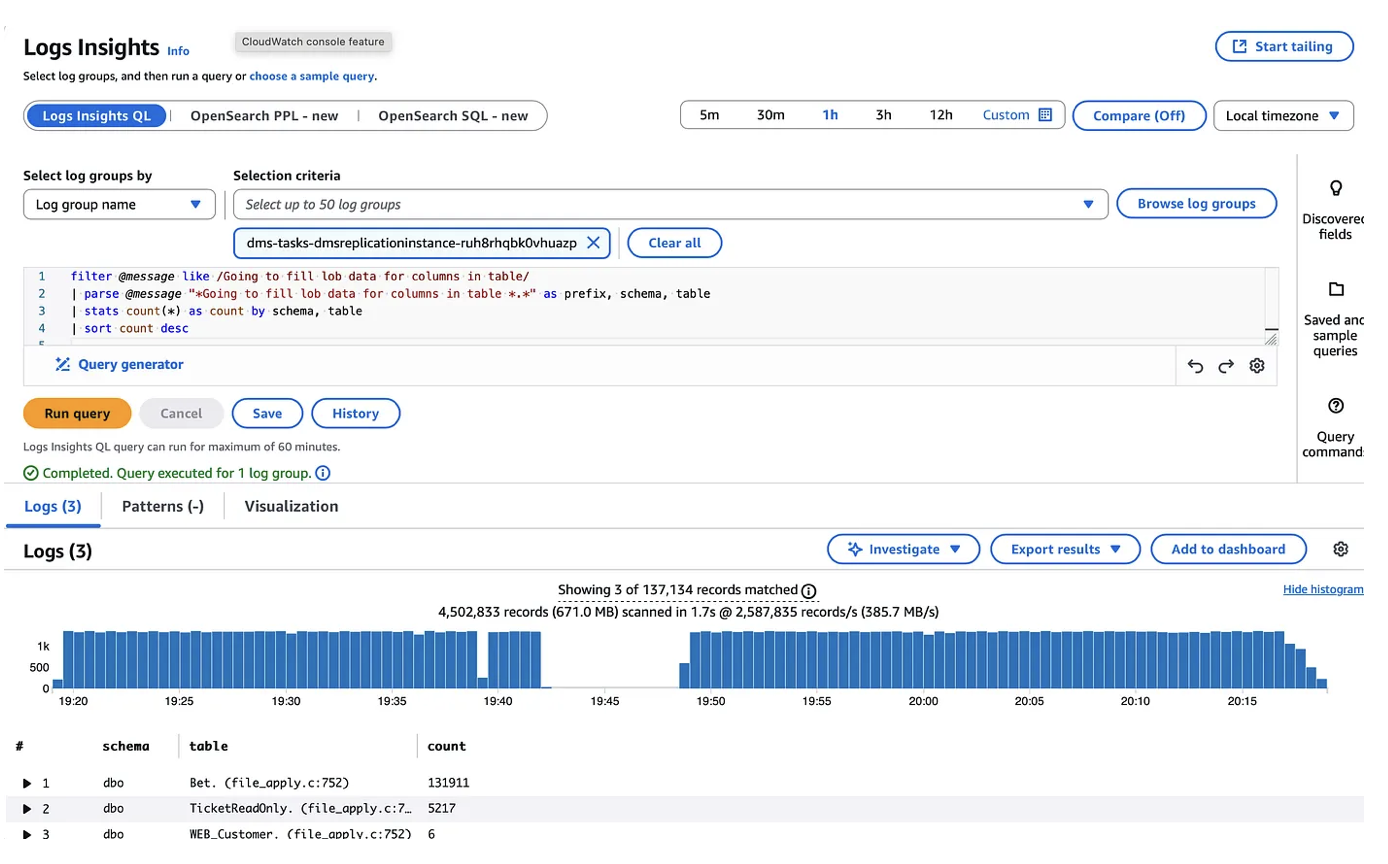
In short, for one hour we had 131,911 log messages for table Bet. Let's assume the file_apply.c call consumes 5 milliseconds. That way, for 1 hour our DMS task spent 11 minutes dealing only with LOBs. Chaos!
Resolution
So we will need to get rid of LOBs somehow. Here's how.
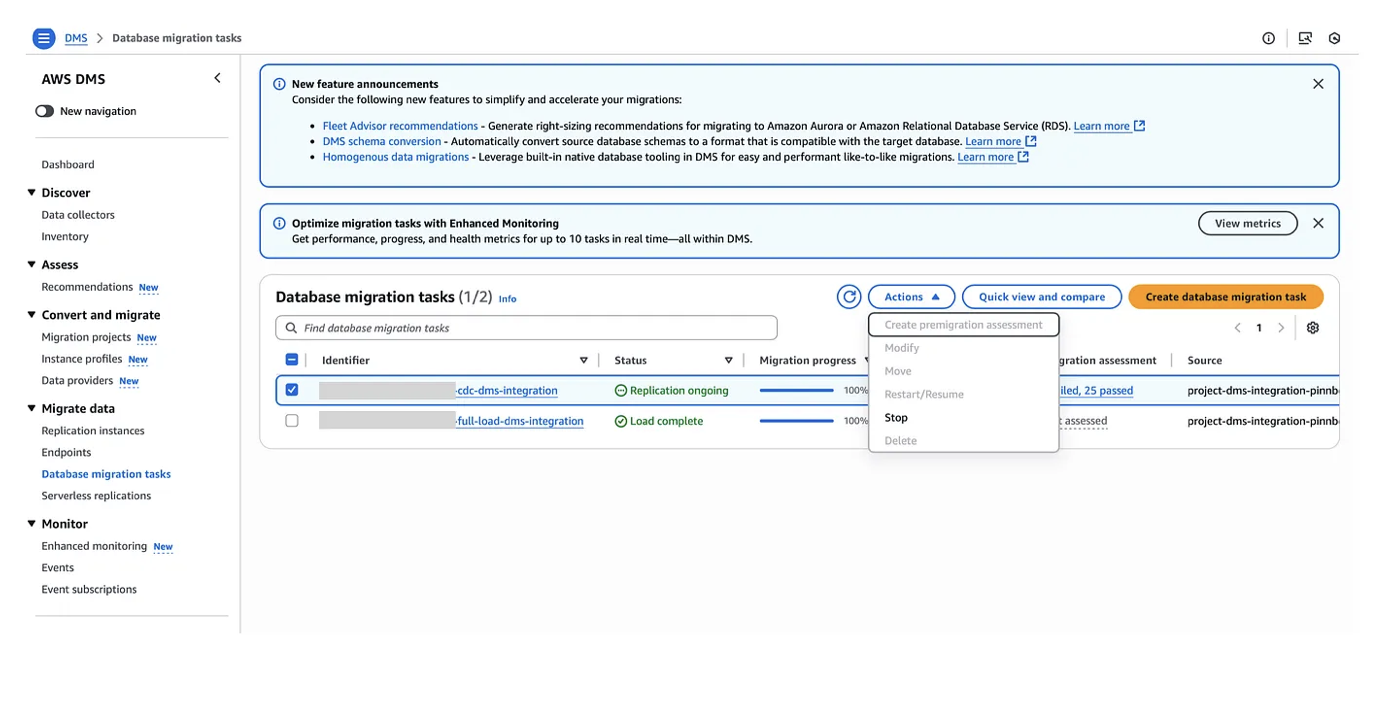
1. Select DMS service from the console. When there, select the DMS task that has high latency. Select Actions. From the drop-down menu, select Stop task.
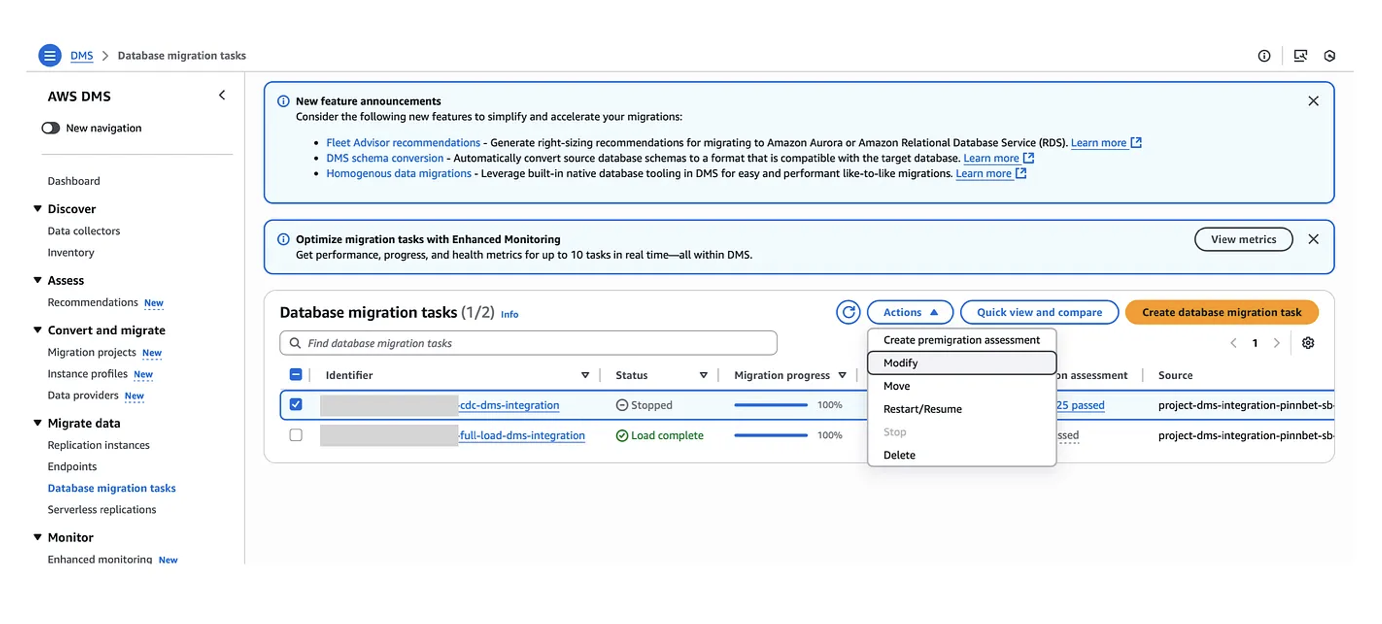
2. Wait for the task to transition to the Stopped state. Click Actions again. Select Modify to open the Modify DMS Task panel.
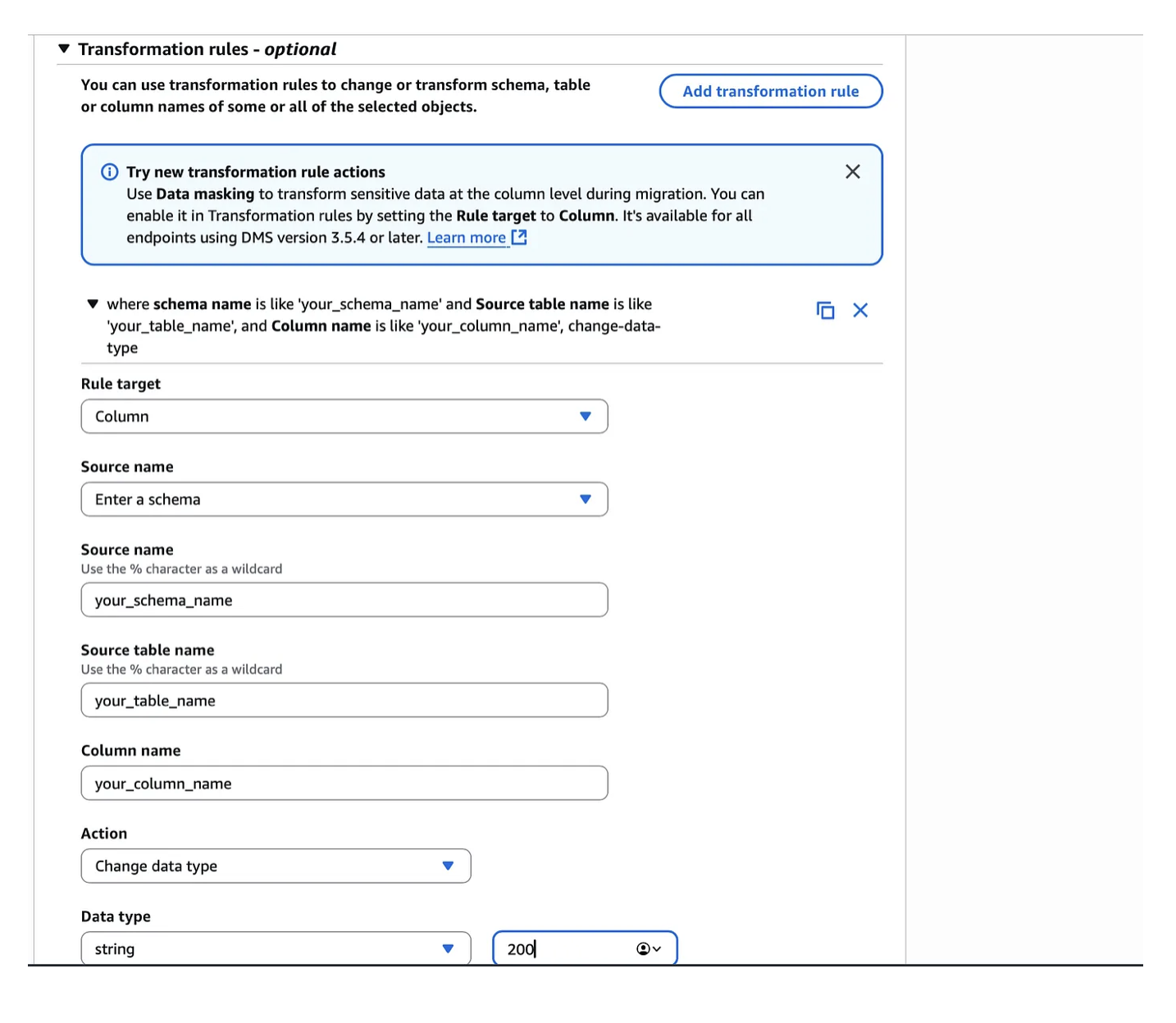
3. Scroll down to the Transformation rules section. Usually LOBs are not needed and you can remove them. If you are not sure whether you need them, you can transform them to string type. Click on Add transformation rule and configure:
- Rule target: Column
- Source name: enter your source table schema name
- Source table name: the table name with LOBs
- Column name: your LOB column
- Action: Change data type
- Data type: string
- Length: double the value of your LOB column maximum length
Click Save.
After some time, go to the monitoring section of your modified DMS task. Check for the latency target metric. It should look similar to the one below.
Takeaway
Whenever a DMS CDC task shows sustained high latency and the source is SQL Server, start with a CloudWatch Logs Insights query for LOB fill messages. The pattern is almost always the same: one or two tables with NVARCHAR(max) columns generating millions of individual LOB fetch operations per day.
The DMS transformation rule approach is low-risk and immediately effective. It requires no schema changes on the source, no changes to downstream consumers, and no task rebuild — just a rule addition and a restart.
At Cloudwalker we apply this pattern proactively during the assessment phase of every SQL Server migration: if we see NVARCHAR(max) columns in high-volume tables, we add the transformation rules before the first full-load run. Prevention beats diagnosis every time.