

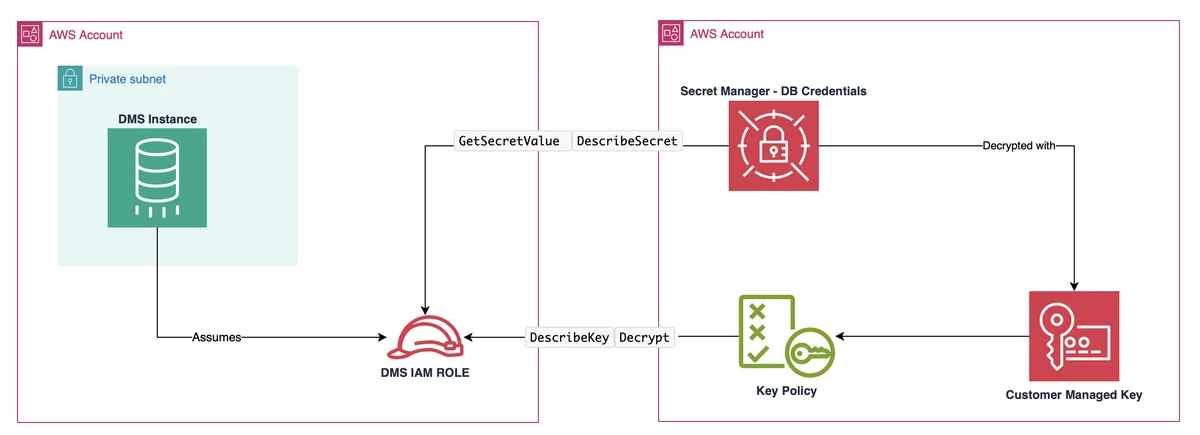
The Scenario
You have AWS DMS running in a DataLake account — where your analytics and replication infrastructure lives — and you need it to connect to a source database whose credentials are stored in a Remote account's Secrets Manager. Rather than duplicating the secret or hardcoding credentials into the DMS endpoint, you want DMS to fetch the secret directly from the remote account at runtime.
This is the cleaner pattern: credentials stay owned by the team that owns the database, rotation continues to work, and the DataLake account never sees the plaintext password in its own configuration.
"Credentials stay owned by the team that owns the database — rotation works, no plaintext duplication."
Prerequisite: Network Connectivity
Before anything else, the DMS replication instance must be able to reach the remote database over the network. This typically means VPC peering, Transit Gateway, or a similar arrangement between the two accounts, plus the appropriate security group and route table entries.
None of the IAM and secret-sharing configuration below will help if the TCP connection to the database can't be established. Sort the networking out first, verify with a basic connectivity test from the DMS subnet, then proceed.
What Needs to Be in Place
On the Remote account (where the secret resides)
The secret must be encrypted with a customer-managed KMS key. The default aws/secretsmanager key cannot be shared across accounts — if your secret is currently using the AWS-managed key, you'll need to recreate it with a CMK before going further. This is the single most common gotcha.
The secret's resource policy must grant secretsmanager:GetSecretValue and secretsmanager:DescribeSecret to the IAM role in the DataLake account that DMS will assume.
The KMS key policy must grant kms:Decrypt and kms:DescribeKey to the same DataLake IAM role. Both policies need to allow the role — granting one without the other is another frequent source of confusion, because the resulting error message points at the secret rather than the key.
The secret value itself must be a JSON object containing the keys DMS expects: username, password, host, and port. DMS reads these specific field names; if the secret is structured differently, the endpoint will fail to connect.
On the DataLake account (where DMS resides)
You need an IAM role trusted by the DMS service (dms.amazonaws.com as the principal in the trust policy) with permissions to:
- Call
GetSecretValueandDescribeSecretagainst the remote secret's ARN - Call
Decryptagainst the remote KMS key's ARN
The DMS endpoint is then configured to assume this role when retrieving credentials. In the endpoint configuration, you point at the remote secret ARN and specify the IAM role ARN under "Secrets Manager access role."
Database-side requirements
The user defined in the secret must actually exist on the database and have sufficient privileges for whatever DMS is doing — typically CDC, which on most engines means replication-level grants (e.g., REPLICATION SLAVE and REPLICATION CLIENT on MySQL, or the equivalent logical replication permissions on PostgreSQL). The cleanest IAM setup in the world won't help if the database user can't read the binlog.
Order of Steps
Assuming network connectivity is already in place:
- Create the IAM role on the DataLake account. You need its ARN before you can reference it from the remote account's policies.
- On the Remote account, update the secret's resource policy and the KMS key policy to allow access to the IAM role from step 1.
- Create the DMS endpoint on the DataLake account, pointing at the remote secret ARN and referencing the IAM role from step 1.
Doing it in this order avoids the chicken-and-egg problem of policies referencing principals that don't exist yet, and makes troubleshooting easier — by the time you create the endpoint, every dependency it needs is already in place.
Policy Reference
The three policy artifacts below are the minimum set needed to wire AWS DMS in one account to a credentials secret in another. Account IDs, region, secret name, and KMS key ID are placeholders; substitute your own.
Account roles in the examples: 111111111111 is the DataLake account (where DMS runs), 222222222222 is the Remote account (where the secret and database live). Region is eu-west-1.
1. IAM Role on the DataLake Account
This role is assumed by the DMS service principal when the replication endpoint connects to the source database. The trust policy is scoped with aws:SourceAccount and aws:SourceArn to defend against the confused-deputy pattern — without these conditions, any DMS endpoint in any AWS account could in principle assume the role.
Permissions are split into two statements (one for Secrets Manager, one for KMS) so that CloudTrail AccessDenied events make the failed permission obvious without log correlation.
AWSTemplateFormatVersion: "2010-09-09"
Description: IAM role on DataLake account, assumed by DMS, granting access
  to a Secrets Manager secret and KMS CMK in a remote account.

Resources:
  DmsCrossAccountSecretRole:
    Type: AWS::IAM::Role
    Properties:
      RoleName: dms-cross-account-secret-access
      AssumeRolePolicyDocument:
        Version: "2012-10-17"
        Statement:
          - Effect: Allow
            Principal:
              Service: dms.amazonaws.com
            Action: sts:AssumeRole
            Condition:
              StringEquals:
                aws:SourceAccount: !Ref AWS::AccountId
              ArnLike:
                aws:SourceArn: !Sub arn:aws:dms:${AWS::Region}:${AWS::AccountId}:endpoint:*
      Policies:
        - PolicyName: ReadRemoteSecret
          PolicyDocument:
            Version: "2012-10-17"
            Statement:
              - Sid: GetRemoteSecret
                Effect: Allow
                Action:
                  - secretsmanager:GetSecretValue
                  - secretsmanager:DescribeSecret
                Resource: arn:aws:secretsmanager:eu-west-1:222222222222:secret:prod/source-db/credentials-aB3xYz
              - Sid: DecryptWithRemoteKmsKey
                Effect: Allow
                Action:
                  - kms:Decrypt
                  - kms:DescribeKey
                Resource: arn:aws:kms:eu-west-1:222222222222:key/8d4f2a1c-7b6e-4f3d-9c2a-1e5b7d8f9a0b
2. Secret Resource Policy on the Remote Account
Cross-account access to a Secrets Manager secret requires both an IAM identity policy on the caller side (covered above) and a resource policy on the secret itself. Both must allow the action — IAM evaluation in cross-account scenarios is a logical AND, not OR.
The Principal here is the full ARN of the DataLake role, not the DataLake account root. Granting to root would let any principal in the DataLake account read the secret if their identity policy allowed it, which is broader than needed.
{
  "Version": "2012-10-17",
  "Statement": [
    {
      "Sid": "AllowDataLakeRoleToReadSecret",
      "Effect": "Allow",
      "Principal": {
        "AWS": "arn:aws:iam::111111111111:role/dms-cross-account-secret-access"
      },
      "Action": [
        "secretsmanager:GetSecretValue",
        "secretsmanager:DescribeSecret"
      ],
      "Resource": "arn:aws:secretsmanager:eu-west-1:222222222222:secret:prod/source-db/credentials-aB3xYz"
    }
  ]
}
3. KMS Key Policy on the Remote Account
Because the secret is encrypted with a customer-managed key, Secrets Manager calls KMS Decrypt on the caller's behalf when GetSecretValue runs. The DataLake role therefore needs Decrypt + DescribeKey on the CMK in addition to the Secrets Manager permissions.
The kms:ViaService condition is recommended belt-and-braces: it ensures the key can only be used to decrypt through Secrets Manager in this region, not through any other AWS service that might happen to call KMS with the same credentials.
The first statement preserves root-account administrative access to the key. Removing it is a common foot-gun — once gone, only AWS Support tickets can recover key administration.
{
  "Version": "2012-10-17",
  "Id": "key-policy-source-db-credentials",
  "Statement": [
    {
      "Sid": "EnableRootPermissions",
      "Effect": "Allow",
      "Principal": { "AWS": "arn:aws:iam::222222222222:root" },
      "Action": "kms:*",
      "Resource": "*"
    },
    {
      "Sid": "AllowDataLakeRoleToDecrypt",
      "Effect": "Allow",
      "Principal": {
        "AWS": "arn:aws:iam::111111111111:role/dms-cross-account-secret-access"
      },
      "Action": [
        "kms:Decrypt",
        "kms:DescribeKey"
      ],
      "Resource": "*",
      "Condition": {
        "StringEquals": {
          "kms:ViaService": "secretsmanager.eu-west-1.amazonaws.com"
        }
      }
    }
  ]
}
Applying and Verifying
The two resource-side policies can be applied via the CLI from the Remote account. The final command verifies end-to-end access from the DataLake side once the role has been provisioned and the trust relationship configured.
# Attach the resource policy to the secret (run in the Remote account)
aws secretsmanager put-resource-policy \
  --secret-id prod/source-db/credentials \
  --resource-policy file://secret-resource-policy.json \
  --region eu-west-1

# Update the KMS key policy (run in the Remote account)
aws kms put-key-policy \
  --key-id 8d4f2a1c-7b6e-4f3d-9c2a-1e5b7d8f9a0b \
  --policy-name default \
  --policy file://kms-key-policy.json \
  --region eu-west-1

# Verify the DataLake role can fetch the secret
# (run from DataLake account with credentials of the DMS role, via STS AssumeRole)
aws secretsmanager get-secret-value \
  --secret-id arn:aws:secretsmanager:eu-west-1:222222222222:secret:prod/source-db/credentials-aB3xYz \
  --region eu-west-1
Common Failure Modes
AccessDeniedException on Secrets Manager only
Symptom: DMS endpoint test fails with an AccessDenied referencing GetSecretValue. The IAM identity policy is fine, the KMS key policy is fine, but the secret's resource policy is either missing or refers to the wrong principal ARN. Re-check that the Principal in the resource policy is the exact role ARN (case-sensitive, no trailing whitespace).
AccessDeniedException on KMS Decrypt
Symptom: GetSecretValue returns AccessDenied with a KMS reference in the error message. The secret's resource policy is allowing the caller, but the KMS key policy is not. The fix is to grant Decrypt + DescribeKey on the CMK to the same role ARN.
Endpoint test passes but replication tasks fail
Symptom: the DMS endpoint connection test succeeds, but the replication task fails to start or stalls at "starting." The IAM/Secrets/KMS chain is correctly configured — the problem is downstream. Check that the database user inside the secret actually has CDC privileges (REPLICATION SLAVE + REPLICATION CLIENT on MySQL, the appropriate logical replication grants on PostgreSQL) and that the database itself has CDC prerequisites enabled (binlog_format=ROW on MySQL, wal_level=logical on PostgreSQL).
Default KMS key was used
Symptom: cannot add a cross-account principal to the key policy at all — the AWS console doesn't expose the policy for editing. The secret was encrypted with the AWS-managed aws/secretsmanager key, which cannot be shared cross-account. Re-encrypt the secret under a customer-managed CMK; the secret value itself stays the same, but the encryption layer changes.
Closing Thought
The pattern looks like a lot of moving parts the first time you set it up, but once you've done it once it becomes routine. The discipline it enforces — credentials owned by the team that owns the database, no plaintext duplication, proper KMS-based encryption boundaries — is worth the upfront effort, especially in regulated industries where audit trails on credential access matter.